Delivery defaults
Open Settings → Delivery to set how your firm follows up on a delivered return and when a client can return a signed authorization. You need permission to send returns to change these preferences.
Set follow-up rules
Under Chasing a delivered return, choose the following:
| Setting | Choices |
|---|---|
| How long to wait before a reminder | After a day, three days, a week, or two weeks. |
| Stop after this many reminders | One, two, three, or five reminders. |
| Clients with several returns waiting | A reminder for every return, or one reminder at a time. |
These choices govern the Remind action in Deliver. They do not switch on automatic signing reminders. Clients who have already opened the return or reported an issue are handled separately from unopened-return follow-up.
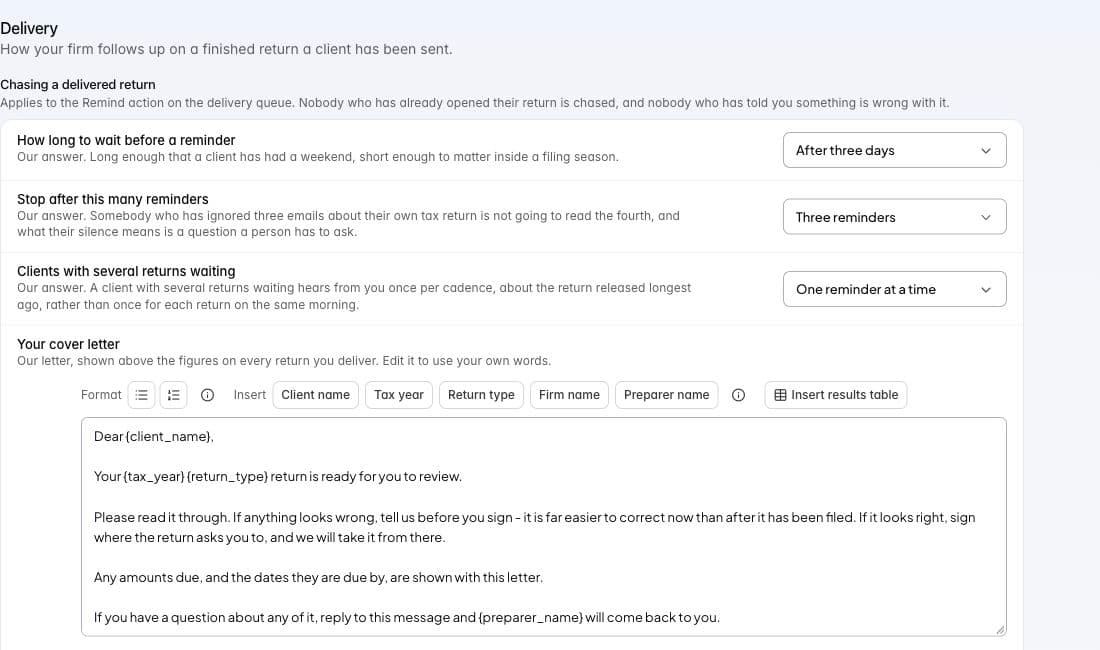
Delivery preferences in Tax staging, with a default letter before client details are inserted.
Choose when signing opens
Set When a client can sign to After they approve the return or Straight away. The first choice keeps client signing closed until approval and resolution of client questions. A signature your firm records from paper is handled separately.
Under Being paid, set Before a client can sign:
- Never hold signing for payment lets the client sign regardless of the invoice.
- Ask, but let them sign requests payment while allowing signing to continue.
- No signing until the invoice is paid uses the invoice status reported by Assure Pro. The product explains when it cannot confirm that status.
These conditions govern returning a signed authorization. They do not prevent the client from reading the return. An individual package can have its own applicable choice.
Set the firm’s retention preference
Use Keep a delivered return for at least to choose your firm’s minimum: 3, 5, 7, or 10 years. Review the keep-until information on the package for its applicable dates. This preference does not delete records automatically or establish the legal retention period for your firm.
Save and restore choices
Choices save individually. Wait for the row’s saving state to finish. Back to our answer restores one default; Put everything back to ours asks you to confirm the wider reset.
Use Letters and final review for the client-facing text, PDF choices, and pre-send checklist. Follow Deliver to send an actual package.