Getting started
Start in Assure Tax after your firm has given you access in Assure Pro. A client organizer collects information; its binder is the workspace where your team prepares the supporting documents.
Before you begin
Confirm the client, tax year, return type, and team member responsible for the work. If your firm uses an engagement in Assure Pro, have that engagement available when you create the organizer.
Your role determines whether you can create organizers, send client requests, edit documents, export data, or deliver returns. See Profile and team access if an action is missing.
Work through a return
- Open Clients and find the client, or click New Organizer.
- Choose the client, tax year, and return type in the organizer form.
- Review the draft in Collect, including the document checklist and questions.
- Send the organizer when it is ready for your client.
- Open Prepare to work with the binder and verify information against its source documents.
- Use Connect for a supported transfer to your tax software.
- Use Deliver to prepare and send the finished return package.
Creating an organizer leaves it in Draft. It does not send anything to the client.
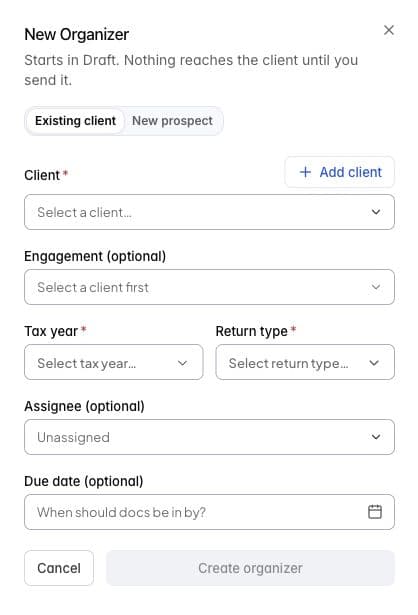
New Organizer in Tax staging. The form is shown before choosing a client.
Keep the stages distinct
Collecting all documents is different from confirming their extracted values. A completed export is different from filing a return. Client delivery and signature tracking are another step after preparation.
Use the status and progress shown in each module to decide what remains. Do not treat Handed off on the dashboard as an e-file acceptance.
Continue
Read Signing in and finding your way, then start an organizer and build its checklist. Use Uploads and interrupted work to understand file progress and recovery.
For unfamiliar labels, use Tax workspace terms.